 Author :
W3C verifiable credentials can sound complicated, but they’re actually a simple way to prove something about yourself online without the usual hassle.
You’ve probably shared a certificate, an ID, or a document at some point, and wished there was an easier, faster, and safer way to do it. These credentials help solve that very problem by letting you share trusted information in a format that’s secure and easy for anyone to check. And because they follow an open standard from the World Wide Web Consortium (the same group behind HTML), they’re built to work across different apps, systems, and countries.
By the time you reach the end of this guide, you’ll know what they are, how they work, and why they matter in everyday life.
What Are W3C Verifiable Credentials and Why Do They Matter?
At their core, W3C Verifiable Credentials (W3C VCs) are secure digital versions of the documents we already use — things like certificates, IDs, or licenses designed so they can be shared and verified online without confusion or manual steps.
The W3C created the Verifiable Credentials Data Model because today’s digital identity system is messy: fake documents are easy to create, verification is slow, and organizations keep data in separate systems that don’t communicate. This makes even simple checks, like confirming a degree far more complicated than they should be.
W3C VCs simplify that entire process using a clear three-role model:
-
Issuer: The organization that creates the credential.
-
Holder: The person who receives and stores it.
-
Verifier: The person or system that needs to confirm it’s real.
What makes this work is that every credential is digitally signed. That signature tells the verifier who issued it and whether it has been changed. These signatures rely on Decentralized Identifiers (DIDs), which act as secure digital identifiers for institutions and individuals, without relying on traditional usernames, passwords, or centralized databases.
Because the entire system follows an open W3C standard, W3C VCs can be used across different countries, platforms, and industries. A university in one region, an employer in another, and a government agency somewhere else can all interpret the same credential without custom integrations, which is why W3C compliance is the starting point for digital credential compliance more broadly.
How Do W3C Verifiable Credentials Work?
To understand how W3C Verifiable Credentials (W3C VCs) work, it helps to break the process into four straightforward steps.
Step 1: Issuance - An organization (the issuer) creates a credential and digitally signs it. This signature proves the credential came from them and hasn’t been altered.
Step 2: Storage - The person receiving the credential (the holder) stores it in a digital wallet. This can be a mobile app, a browser extension, or any secure wallet designed for verifiable credentials.
Step 3: Presentation - When the holder needs to prove something, like a qualification or identity, they share a verifiable presentation. This is simply a packaged version of the credential that includes only the needed information and its digital proof.
Step 4: Verification - The verifier checks the digital signature and the issuer’s DID to confirm the credential is authentic and still valid. This happens instantly, without emails, PDFs, or manual follow-ups.
A key detail is that trust is established automatically. No third party is needed to confirm the claims because the cryptographic signature already carries the proof.
And while some systems use blockchain to anchor identifiers or revocation registries, it’s important to note that blockchain is optional. W3C VCs work perfectly well without it because the core trust comes from the digital signature and the DID.
What Are the Core Components of the W3C Verifiable Credentials Model?
Every W3C Verifiable Credential (W3C VC) follows a structured model that makes the credential easy to understand, share, and verify.
The credential subject data includes the actual information about the person or thing the credential refers to. This could be a name, a course completed, an employee ID, or any verifiable achievement.
Alongside that, the credential contains metadata. This usually includes the issuer’s identity, when the credential was issued, and when it expires (if it does). Think of it like the header of a document — it tells you who created it and when.
W3C VCs also include a field called “@context” and a schema, both based on JSON-LD. In simple terms, these define what each field means so different systems can interpret the credential consistently. It’s like giving everyone a shared dictionary so nothing gets lost in translation.
The proof section is where the digital signature lives. It states how the issuer signed the credential and which verification method was used. This is what allows a verifier to instantly check if the credential is authentic.
Then there’s the credential status, which lets verifiers know whether the credential has been revoked. This is often managed through a status list or a revocation endpoint that can be checked during verification.
Behind the scenes, the issuer also has a DID Document. This is a small file that describes the issuer’s public keys and verification methods. Verifiers use it to confirm that the signature on the credential matches the issuer’s DID, without needing a centralized database.
All of this works together with digital wallets, which holders use to store, manage, and share their credentials. A wallet ensures that the individual, not an institution, controls when and how their credentials are presented.
| Component | Meaning (Simple Terms) | Why It Matters |
|---|---|---|
| Credential Subject Data | The actual info about the person or achievement | Provides the core proof being shared |
| Metadata | Issuer, issuance date, expiration | Ensures the credential can be trusted and understood |
| @context & Schema | Shared definitions for each data field | Guarantees consistent interpretation across systems |
| Proof Section | Digital signature + verification method | Provides tamper-evidence and authenticity |
| Credential Status | Indicates if credential is active, expired, or revoked | Supports real-time verification |
| DID Document | Issuer’s public keys and methods | Enables independent validation of signatures |
| Digital Wallet | Where holders store and share credentials | Gives users full control and portability |
Components of a W3C verifiable credential
How Do W3C Verifiable Credentials Compare to Digital Certificates or PDFs?
Most people still rely on PDFs or basic digital certificates to prove qualifications, but these formats come with clear limitations: they’re easy to edit, hard to verify, and often require manual emails or phone calls to confirm authenticity.
W3C Verifiable Credentials (W3C VCs) solve these issues by adding built-in trust. Every VC is digitally signed, so even the smallest change breaks the signature. A verifier can check the signature and the issuer’s DID in seconds, without contacting anyone.
Here’s a quick comparison between the two:
| Feature | PDF / Digital Certificates | W3C Verifiable Credentials |
|---|---|---|
| Easy to forge | Yes | No — signature protects integrity |
| Verification time | Slow, often manual | Instant |
| Selective disclosure | No | Yes |
| Revocation support | None | Built-in status checks |
| Interoperability | Limited | Global, open standard |
| Storage | Files or email attachments | Secure digital wallets |
PDF certificates vs W3C verifiable credentials
What Are the Real-World Use Cases of W3C Verifiable Credentials Today?
W3C Verifiable Credentials (W3C VCs) are already being used across industries where trust and verification matter. Their value comes from being easy to share, machine-verifiable, and globally interoperable.
Education
Universities and training providers use W3C VCs for diplomas, transcripts, micro-credentials, and course completions. Students benefit because they can share their achievements instantly, and institutions reduce fraud and manual verification work. These credentials also support international mobility, where applications often require fast, cross-border verification.
Employment and Hiring
Employers use W3C VCs to verify skills, past work experience, and professional licenses. Instead of checking PDFs or calling previous institutions, HR teams get instant confirmation of a candidate’s claims, saving time and improving trust in the hiring process.
Government Services
Governments issue digital IDs, driving licenses, residence permits, and compliance certificates using VCs. Since VCs follow an open standard, they work across departments and agencies without custom integrations.
Healthcare
Medical boards use W3C VCs for doctor and nurse licenses, training records, and continuing education proofs. Hospitals and clinics can verify credentials quickly, even across regions, and avoid risks associated with manual checks.
In all these scenarios, the same benefit repeats: fast, secure, privacy-preserving verification that works anywhere.
How Are W3C Verifiable Credentials Verified Online?
Verifying a W3C Verifiable Credential (W3C VC) is designed to be fast and straightforward. Instead of emailing institutions or checking PDFs manually, a verifier can confirm everything in seconds.
The process usually starts with the holder sharing the credential through a QR code, link, or wallet app. For a detailed breakdown of how credential verification works — including what each check confirms — see our dedicated guide. This generates a verifiable presentation, which contains the required information along with its digital proof.
When the verifier receives it, their system automatically checks the digital signature against the issuer’s DID. If the signature matches and the DID is valid, the credential is authentic. The system then checks the credential status to confirm it hasn’t been revoked or expired.
All of this happens without contacting the issuer or relying on a central database. The verification is based on cryptographic proof, not trust in an intermediary. And while some systems use blockchain to store DIDs or status lists, the verification process itself does not require blockchain.
In simple terms:
A valid signature + a valid DID + an active status = a verified credential.

How Can Institutions Convert Existing Certificates into W3C Verifiable Credentials?
If your institution has years’ worth of PDFs or paper certificates, you can convert them into W3C Verifiable Credentials (W3C VCs) without changing your existing process. Most digital credentialing platforms guide you through the steps, so you don’t need technical skills or knowledge of the underlying standards.
Here’s the process in a simple format:
-
Gather basic certificate details: Collect the information from your old certificates (names, dates, programs, grades, completion details).
-
Upload the information into a credentialing platform: You can upload it directly from spreadsheets, records, or PDF-extracted data.
-
Match the information to the W3C VC structure: The platform helps you connect your fields (like “Student Name” or “Course Title”) to the correct VC fields.
-
Set up or choose a credential template: Add your institution’s logo, colors, and layout so the final credential still reflects your branding.
-
Generate the verifiable credentials: The platform signs each credential digitally, turning your old certificate data into secure W3C VCs.
-
Send the credentials to learners: Recipients get their credentials in a wallet-friendly format that’s easy to store, share, and verify anywhere.
This keeps your original certificate content the same, but upgrades it to a format that’s more secure, easier to verify, and better suited for today’s digital needs.
How CertifyMe Supports W3C Verifiable Credentials for Institutions
CertifyMe is built to help institutions issue and manage W3C Verifiable Credentials (W3C VCs) without adding complexity to their workflow. Every credential issued through CertifyMe is digitally signed, following the W3C Verifiable Credentials Data Model, so verifiers can trust the information instantly.
Institutions can create DID-based issuer profiles, which give them a secure digital identity that verifiers can check during the verification process. Credentials issued on the platform come with QR-based verification, making it easy for employers, universities, or government offices to confirm authenticity in seconds.
CertifyMe also supports wallet-ready credentials, allowing learners to store and share them from any compatible digital wallet. The system works across Web2 and Web3 environments, which means institutions don’t need blockchain expertise or specialized infrastructure.
Designed with higher education and professional training in mind, CertifyMe provides a simple path for organizations to adopt open, interoperable, and verifiable digital credentials.
Conclusion
W3C Verifiable Credentials give organizations and individuals a clearer way to share information that others can rely on without the usual delays, doubts, or back-and-forth. If you want to understand how W3C fits alongside other verifiable credential standards beyond W3C, such as Open Badges 3.0, Europass, and SD-JWT — that’s covered in detail separately.
If you want to understand how W3C fits alongside other verifiable credential standards beyond W3C, such as Open Badges 3.0, Europass, and SD-JWT — that’s covered in detail separately. Instead of depending on files that can be misplaced or misread, credentials follow a consistent format that’s easy for anyone to check.
They’re useful across many environments — universities managing student records, employers verifying skills, training providers issuing completions, or government teams confirming identity details. In each case, the goal is the same: make trusted information easier to share and straightforward to confirm, no matter where it’s used.
What matters most is that W3C VCs bring structure to a process that has been scattered for years. They help people keep their important information in one place, and they help organizations reduce unnecessary effort while improving accuracy.
If you’re exploring how to move toward a verifiable and future-ready credential system, CertifyMe can guide you through the full process, from setup to smooth adoption. Book a quick demo to see how W3C-aligned credentials can fit into your work, your workflows, and your goals.
FAQs About W3C Verifiable Credentials
Which platforms support issuing W3C verifiable credentials?
You can issue W3C verifiable credentials through platforms built for digital credentials, open-source identity tools, and DID-based systems. CertifyMe is one such platform that issues credentials following the W3C standard so they are secure, easy to share, and simple to verify.
How can you verify W3C verifiable credentials online?
Verification usually happens by scanning a QR code or opening a secure verification link. The system checks that the credential was signed by the right organization and that it hasn’t been changed or revoked. On platforms like ours, verification only takes a few seconds.
Which blockchain networks are compatible with W3C verifiable credentials?
Some issuers use networks like Ethereum, Polygon, Hyperledger Indy, or ION to store parts of their verification setup. These blockchains are only used to anchor identity information — the credentials themselves are not stored on any blockchain. Using blockchain is optional, not required.
How can a W3C verifiable credential be revoked?
The issuer can update the credential’s status through the digital credentialing platform they used to issue the credential. If a credential is ever revoked (made invalid), the system will show it immediately. The holder doesn’t need to do anything. Revocation happens automatically in the background.
What are common use cases for W3C verifiable credentials in education?
Schools and universities use W3C VCs for degrees, transcripts, badges, and course completions. Students can share these credentials instantly with employers or other institutions. They also reduce the manual work that comes with checking PDFs and paperwork.
How do you check the authenticity of a W3C verifiable credential?
The verifier checks the credential’s digital signature, the issuer’s identity, and whether the credential is still valid. This happens automatically through a verification page or URL. If all checks match, the credential is authentic.
How do you set up a Decentralized Identifier (DID) for W3C VC issuance?
A Decentralized Identifier (DID) is like your organization’s trusted digital ID on the internet and W3C verifiable credentials use it to show who issued them in a way that others can check. In most digital credentialing platforms, you set this up by going to your issuer or organization settings. On confirming essential details, the system creates the DID and the small identity file (DID document) for you. After that one-time setup, every credential you issue is automatically linked to this DID, so verifiers can confirm it really came from your organization without you needing to manage any of the technical steps manually.
Are W3C verifiable credentials stored on the blockchain?
No. The credential stays with the holder in their digital wallet. Only optional technical details, like parts of an issuer’s identity setup, may be anchored to a blockchain.
Are W3C Verifiable Credentials GDPR compliant?
Yes. W3C VCs follow a “share only what you need” approach, which helps with privacy laws like GDPR. Since the credential stays with the holder and isn’t stored on a public ledger, it aligns well with data protection requirements.
Can W3C Verifiable Credentials work offline?
Yes, basic checks can work offline if the verifier already has the needed information stored. However, checking whether a credential is revoked usually requires an online connection.
Do W3C Verifiable Credentials require a crypto wallet?
No. W3C VC wallets are not crypto wallets. They are simple apps made for storing and sharing digital credentials, and they do not involve cryptocurrency or blockchain transactions.
Are W3C VCs free to verify?
Yes. Verifying a VC does not cost the holder or the verifier anything. The system uses open standards and publicly available keys to confirm authenticity.
Can W3C VCs be shared on LinkedIn?
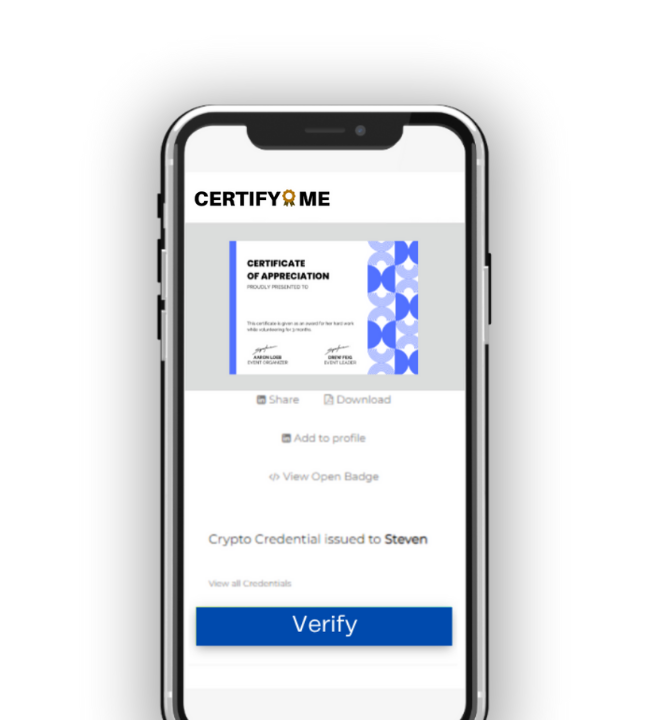
Yes. Digital wallets and issuing platforms often include a “share” button that lets holders add a credential to LinkedIn or other social platforms. You can witness it in this sample digital credential. This makes it easy to highlight verified achievements online.